One-tap toggle to a distraction-free, time-critical interface.
Evaluation Essentials
Emergency Mode is a new feature currently being evaluated in JRCALC Plus and is not yet available to all users.
Access is currently limited to selected Trusts who have opted in to support testing and provide feedback.
The evaluation period runs from 1 July 2026 to 28 July 2026, after which the feature will likely be temporarily switched off for review.

In response to requests to streamline the access to the JRCALC guidelines in an emergency with a patient in front of you we are pleased to announce to development of Emergency Mode. For those of you who remember to old JRCALC Pocket book, this provides rapid access to similar information (without any additional bulk in your pocket). You can return to the full reference version at any time by moving the slider back.
Dr Simon Brown, Assistant Medical Director, South Central Ambulance Service


Introducing
Emergency Mode
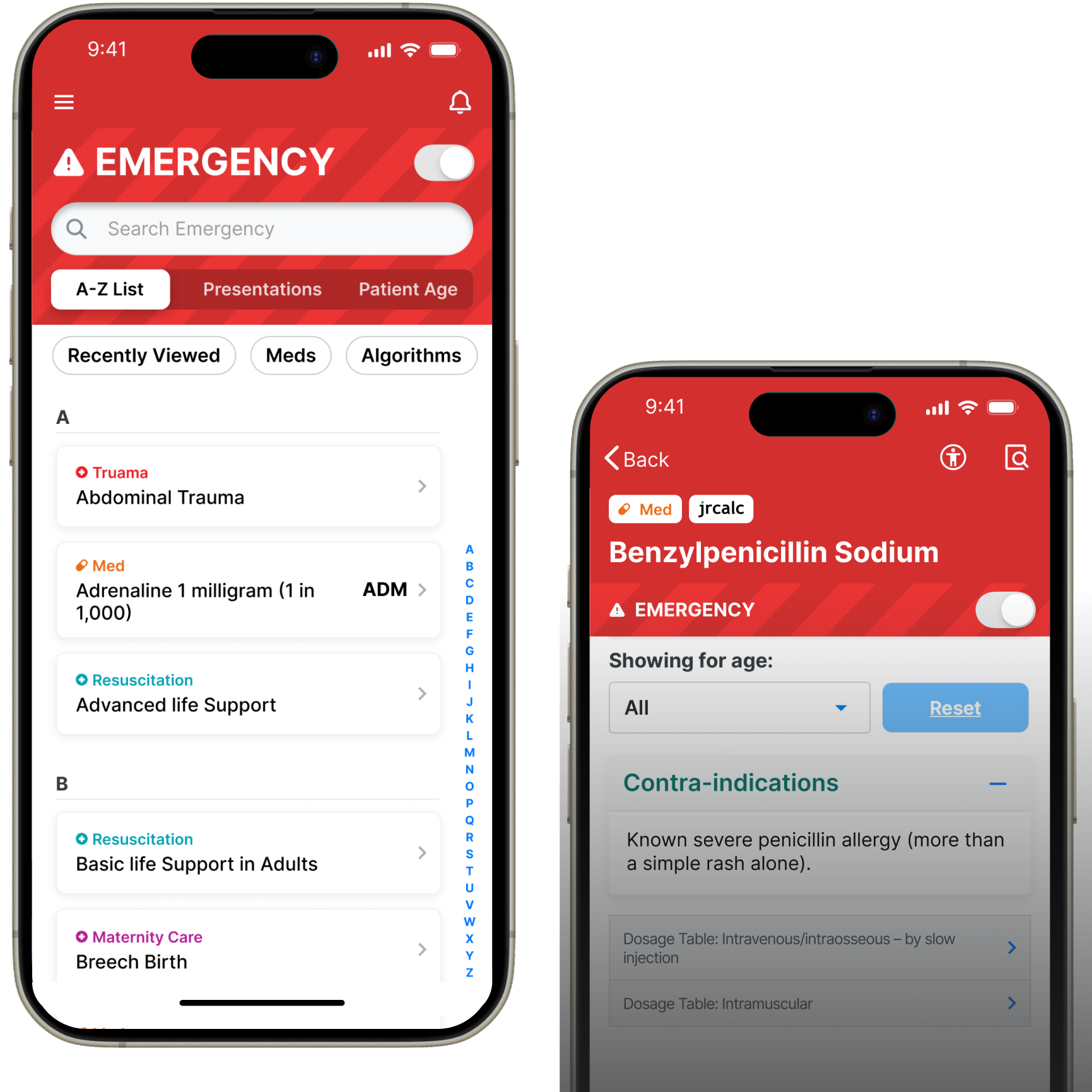
Enter Emergency Mode by tapping the toggle at the top of the dashboard and on all relevant guidelines with an Emergency Mode equivalent.
Designed for time‑critical situations with a new simplified layout showing only the most essential guidance, helping clinicians make fast, confident decisions.
Watch
Watch this short video demonstrating how Emergency Mode works in practice.
Key Features
Before and After
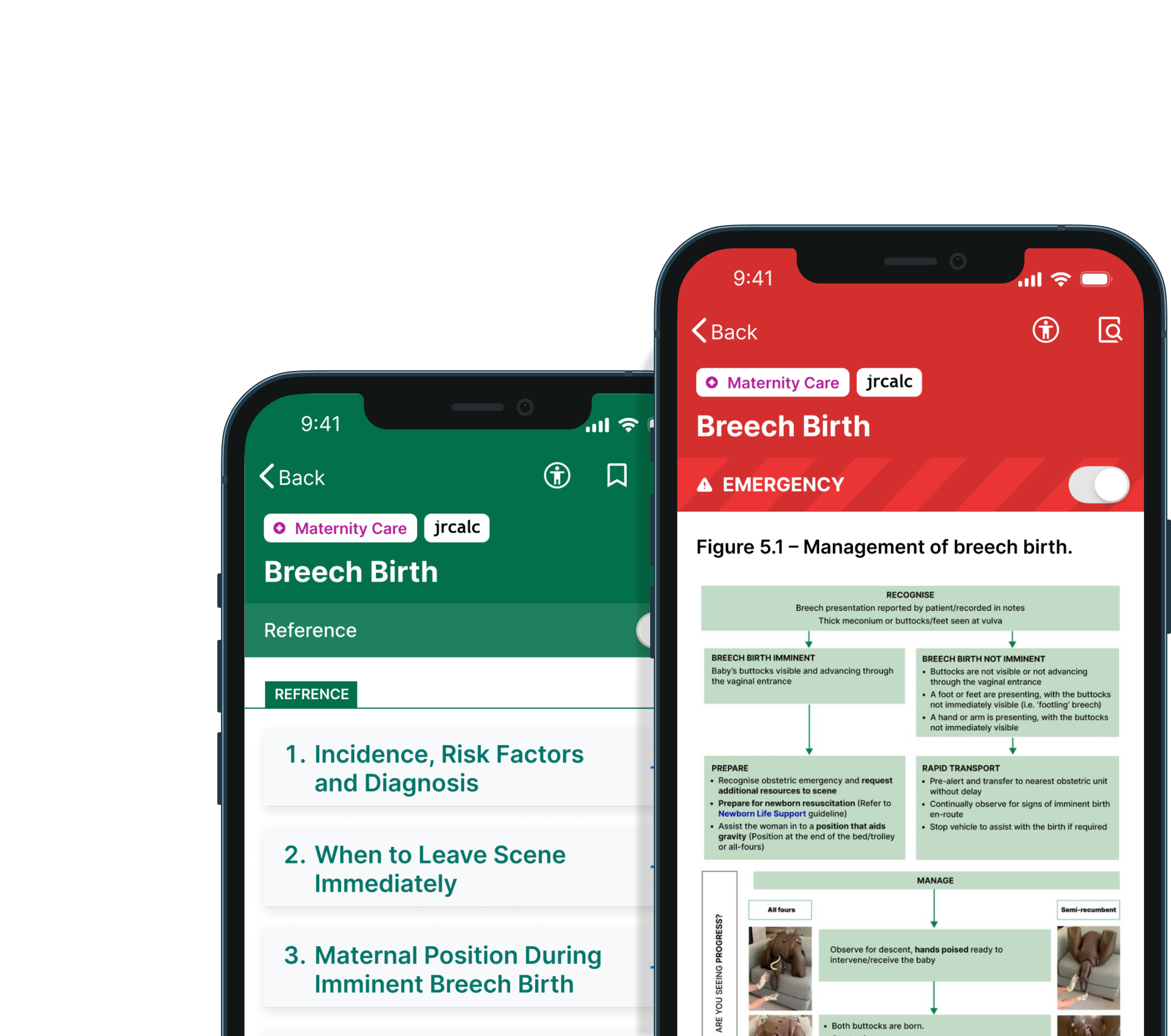
REFERENCE MODE
In Reference Mode you will see full guideline detail, resources and supporting content.
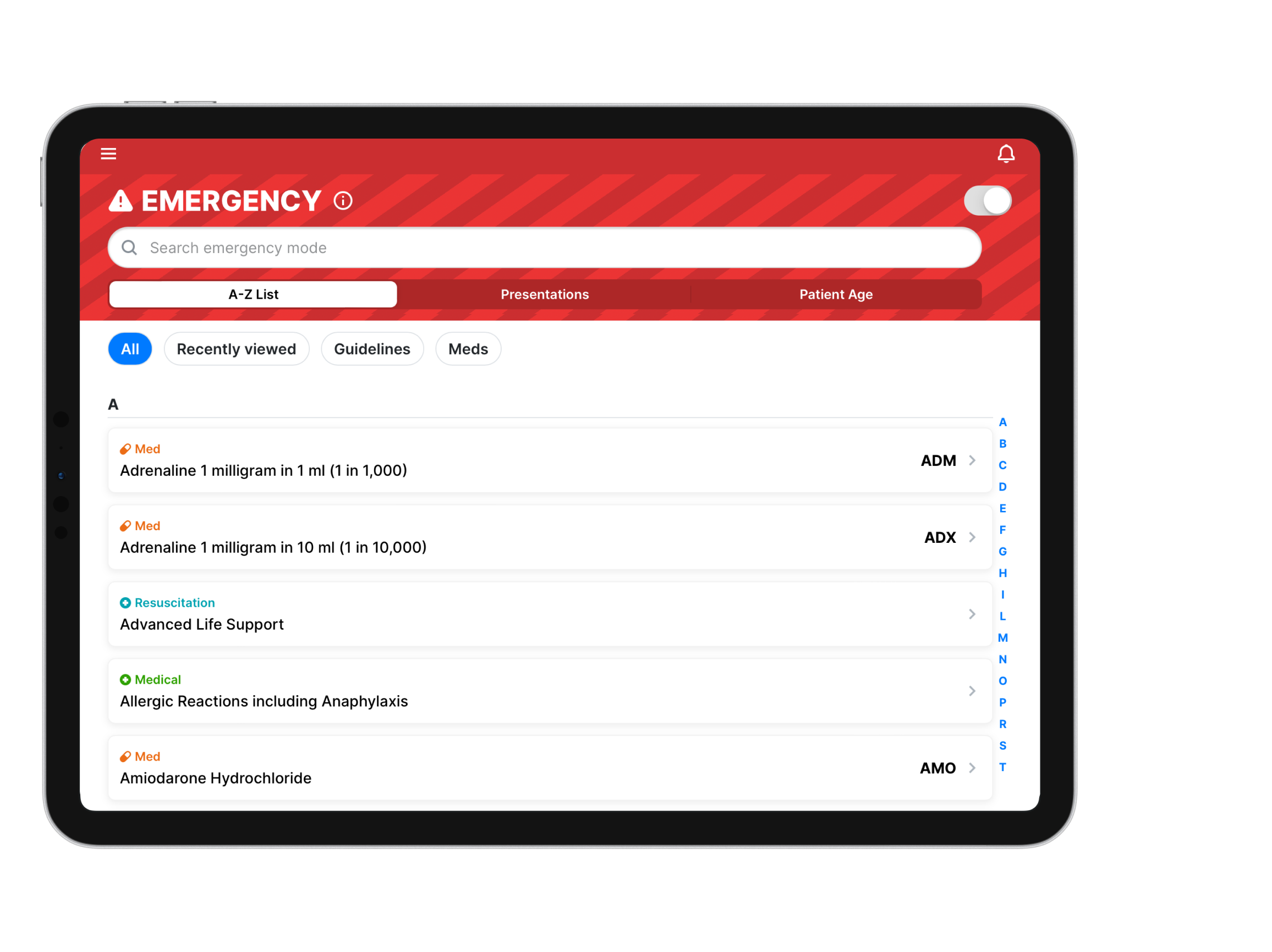
EMERGENCY MODE
In Emergency Mode you will only see the most essential steps and information, presented clearly and quickly.
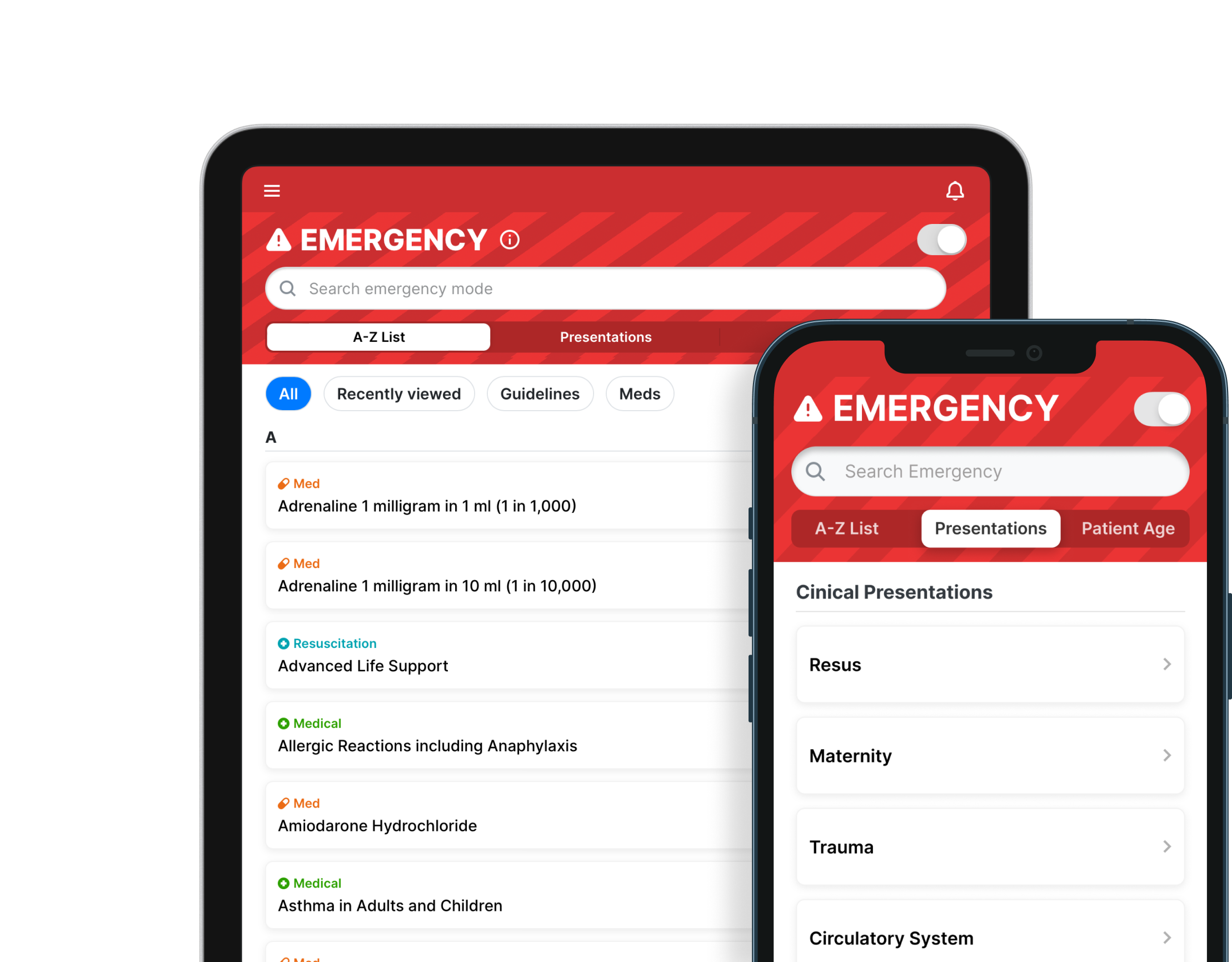
Navigating
Emergency Mode
A-Z LIST
A Simple alphabetical list of all emergency-only guidelines, with chip filters to narrow options down fast.
PRESENTATIONS TAB
Guidelines grouped by body system, helping you find the right guidance based on how the patient presents.
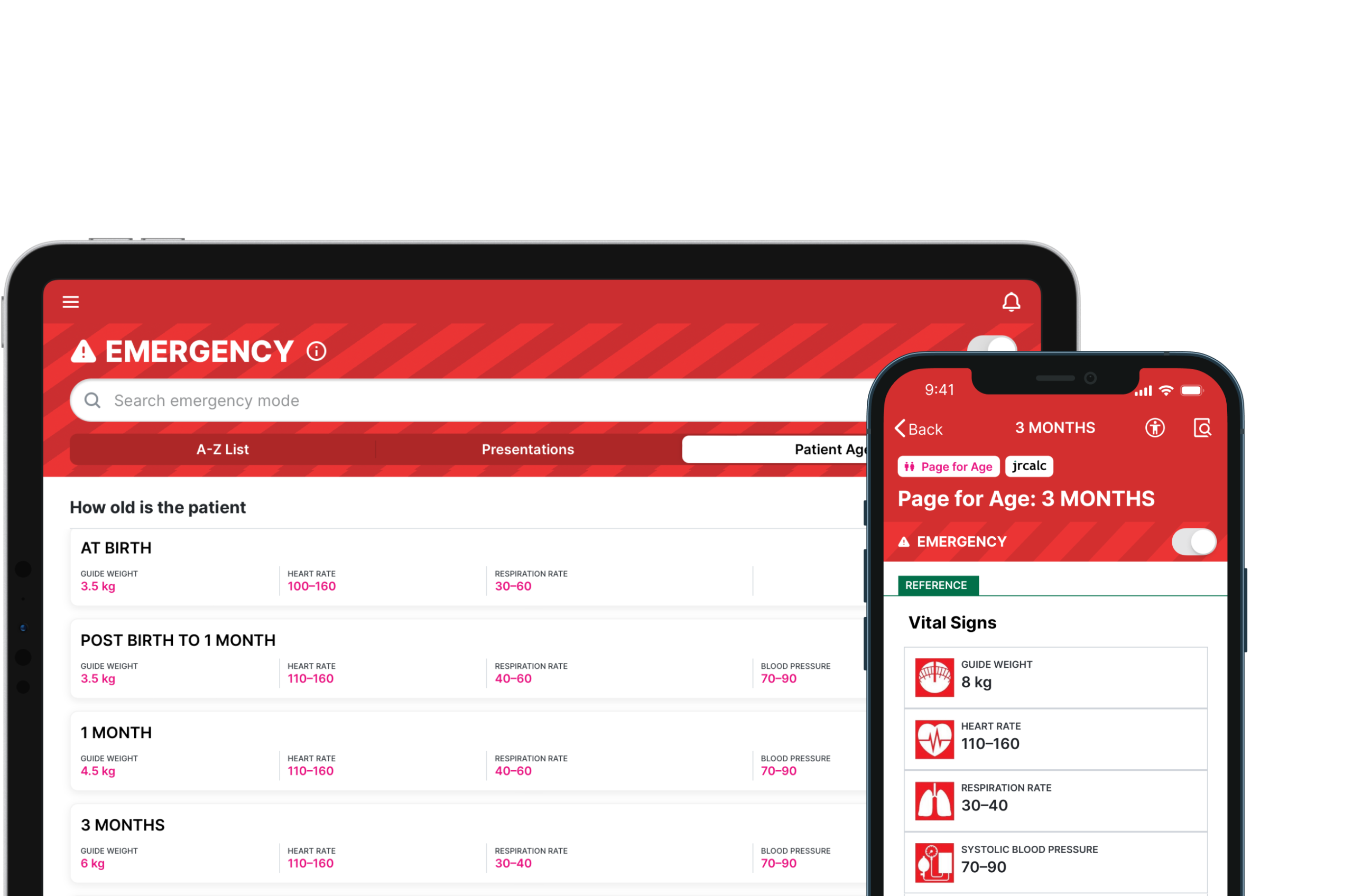
PATIENT AGE TAB
Select the patient’s age (if known) to see the related Page for Age. This view also displays age-specific vital signs for quick reference.
SEARCH
There is a search bar at the top to search across any of these tabs.
Help us develop Emergency Mode
Your feedback for this evaluation is essential to the development of Emergency Mode.
You can answer our questionnaire multiple times, so you can feed back on your initial impression as well as anything you notice in your ongoing use of Emergency Mode throughout the evaluation.
Frequently Asked Questions
ABOUT EMERGENCY MODE
What is Emergency Mode?
Emergency Mode is designed for time‑critical situations. It presents a simplified layout with only the most essential guidance, helping users make fast, confident decisions.
Which guidelines are included in Emergency Mode?
Adrenal Insufficiency Patients
Adrenaline 1 milligram in 1 ml (1 in 1,000)
Adrenaline 1 milligram in 10 ml (1 in 10,000)
Advanced Life Support
Allergic Reactions including Anaphylaxis
Amiodarone Hydrochloride
Asthma in Adults and Children
Atropine Sulfate
Basic Life Support in Adults
Basic Life Support in Children
Benzylpenicillin Sodium
Breech Birth
Cardiac Arrest during Pregnancy
Cardiac Arrhythmia and Sudden Cardiac Death
Chlorphenamine
Chronic Obstructive Pulmonary Disease
Cord Prolapse
Diazepam Injection
Diazepam Rectal
Drowning
Emergency Tracheostomy and Laryngectomy Pre-Hospital Management
Foreign Body Airway Obstruction
Furosemide
Glucagon
Glucose 10%
Glucose 40% Oral Gel
Glycaemic Emergencies in Adults and Children
Heart Failure
Hydrocortisone
Implantable Cardioverter Defibrillator
Ipratropium Bromide
Labour and Imminent Birth
Magnesium sulfate solution for injection
Management and Resuscitation of Patients with Left Ventricular Assist Devices (LVADs)
Management of Post-partum Haemorrhage (PPH)
Maternity Care (including Obstetric Emergencies Overview)
Meningococcal Meningitis and Septicaemia
Midazolam injection (Midazolam intramuscular)
Midazolam oromucosal solution pre-filled oral syringes (Midazolam buccal)
Misoprostol tablet
Naloxone Hydrochloride
Newborn Life Support
Overdose and Poisoning in Adults and Children
Page for Age
Pre-eclampsia and Eclampsia
Prednisolone
Pulmonary Embolism
Return of Spontaneous Circulation
Salbutamol
Seizures in Adults
Seizures in Children
Sepsis
Shoulder Dystocia
Sickle Cell Disease
Sodium Chloride 0.9%
Syntometrine® injection (Ergometrine maleate with oxytocin injection)
Termination of Resuscitation in Adults
Termination of Resuscitation in Children
Tranexamic acid 100mg in 1mL solution for injection
Trauma Emergencies in Adults – Overview
Trauma Emergencies in Children – Overview
Who has access to Emergency Mode during the evaluation period?
During this evaluation period, Emergency Mode has been enabled for everyone at SCAS who has access to JRCALC Plus.
Has Emergency Mode been risk assessed?
Emergency Mode has been assessed in line with the DCB0129 clinical safety standard. A full clinical safety case and updated hazard log have been completed to support the evaluation.
What happens if Emergency Mode is unavailable?
Should Emergency Mode be unavailable, the familiar Reference Mode – the app as you know it – will remain available and can be used as it always has.
How do I enter and exit Emergency Mode?
To enter Emergency Mode, tap the toggle at the top of the dashboard. The toggle appears only where it’s relevant – on the dashboard and on any guideline that has an Emergency Mode equivalent. When in Emergency Mode, the toggle remains visible at all times. This allows you to easily jump back to the full version instantly. To exit Emergency Mode simply click the toggle again.
ABOUT THE EVALUATION
What is the purpose of this evaluation?
The evaluation aims to assess the usability, safety and clinical value of Emergency Mode in frontline practice. It will help determine whether the feature improves access to critical information and whether any refinements are needed before wider rollout.
What steps have been made before the launch of this evaluation?
Various Steps have already been completed to get to this stage of the evaluation, including:
Is this a Clinical Trial?
No. The use of emergency mode is just a different way of using the JRCALC Clinical Guidelines; you can revert back to the familiar Reference mode easily, and this has been fully documented. In addition, it does not change clinical practice or patient experience and does not meet the threshold cited in the document Transforming the UK’s clinical trial landscape, which updated regulations in April 2025.
How long does the evaluation period last?
The evaluation period runs from 1 July 2026 to 28 July 2026.
What will happen after the evaluation period ends?
The feature will be temporarily switched off for review, unless your Trust decides to keep it turned on after assessing initial feedback.
Is participation mandatory?
Your Trust has decided to participate in this evaluation and give access to all staff using JRCALC Plus. However, Reference Mode remains available at all times and you can choose to only use this. If you do opt to stick to Reference Mode, we would appreciate feedback as to why you made that decision. You can fill in our survey HERE.
What should I do if I identify an issue?
To aid the evaluation any incidents or near misses that occur must be reported through datix using the ICT systems category of incident, then the JRCALC app sub category.
How do I provide feedback?
To provide feedback on Emergency Mode, you can fill out our survey HERE. You can answer this survey multiple times, so you can feed back on your initial impression as well as anything you notice in your ongoing use of Emergency Mode throughout the evaluation.
Will my feedback be anonymised?
When you fill out our Emergency Mode survey, we will ask you to confirm which Trust you work for, to put your comments into context. There will also be an option to include your email address, should you be open to discussing your feedback in more detail, but this is optional.
What data is collected during the evaluation period?
We are collecting anonymised usage data about the frequency and length of use and navigation patterns within Emergency Mode.
Will participants be informed of the outcomes?
Yes. Once the evaluation is complete, the final report will be shared on the SCAS Hub.
Need
Support?
Contact our apps team.
 https://www.classprofessional.co.uk/wp-content/uploads/2026/03/Logo-1.png
1080
1080
Emma Phillips
https://www.classprofessional.co.uk/wp-content/uploads/2026/01/CP_logotype_horiz_purple_RGB.svg
Emma Phillips2026-05-08 14:58:102026-05-27 08:21:48A New App for Ambulance Drivers
https://www.classprofessional.co.uk/wp-content/uploads/2026/03/Logo-1.png
1080
1080
Emma Phillips
https://www.classprofessional.co.uk/wp-content/uploads/2026/01/CP_logotype_horiz_purple_RGB.svg
Emma Phillips2026-05-08 14:58:102026-05-27 08:21:48A New App for Ambulance Drivers https://www.classprofessional.co.uk/wp-content/uploads/2023/02/ParaFolio-Logo-2.png
3375
3375
Emma Phillips
https://www.classprofessional.co.uk/wp-content/uploads/2026/01/CP_logotype_horiz_purple_RGB.svg
Emma Phillips2026-05-08 11:59:282026-05-12 14:32:55ParaFolio Update: A Stronger Infrastructure
https://www.classprofessional.co.uk/wp-content/uploads/2023/02/ParaFolio-Logo-2.png
3375
3375
Emma Phillips
https://www.classprofessional.co.uk/wp-content/uploads/2026/01/CP_logotype_horiz_purple_RGB.svg
Emma Phillips2026-05-08 11:59:282026-05-12 14:32:55ParaFolio Update: A Stronger Infrastructure
iCPG is a digital version of the official JRCALC guidelines for ambulance service practitioners. It allows emergency services staff to access up-to-date guidance on medical conditions and drug dosages at...
View